
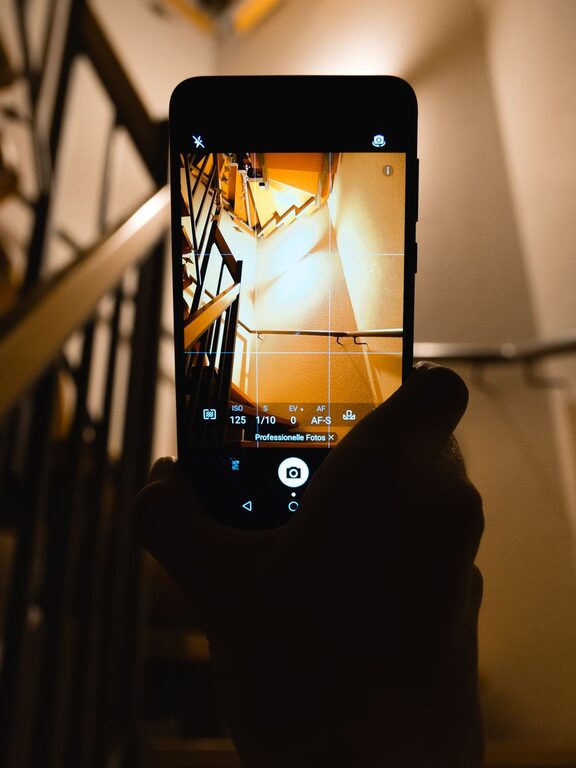
Taking better photos with your phone does not require expensive equipment or advanced skills. Most smartphones have powerful cameras that can capture sharp, colorful images when you use a few simple techniques.
The biggest improvements usually come from how you frame the photo, use available light, and decide what you want viewers to notice. The tips below will help you take more thoughtful photos in everyday situations.
Start With a Clean Camera Lens
Before taking a photo, quickly wipe your phone’s camera lens with a soft, clean cloth. Dust, fingerprints, and smudges can make images look blurry, hazy, or less colorful.
Your shirt may seem convenient, but rough fabric can scratch the lens over time. A microfiber cloth is a better choice. Make cleaning the lens a habit, especially if your phone has been in a pocket, bag, or case.
Use Natural Light
Light has a major effect on the quality of a photo. Whenever possible, use natural light from a window, doorway, or outdoor space.
Soft light is often easier to work with than strong direct sunlight. Overhead midday sun can create deep shadows, while cloudy weather provides even, gentle lighting. Indoors, place your subject near a window and turn it slightly toward the light.
Try to avoid placing a bright window directly behind your subject. This can make the subject appear very dark. Instead, position yourself so the light falls on the front or side of the subject.
Watch for Harsh Shadows
Strong sunlight can create unwanted shadows across faces and objects. If you are photographing a person outside, try standing in open shade, such as beneath a tree or near the shaded side of a building.
You can also take advantage of the softer light found during the early morning or late afternoon. These times often create warmer, more attractive images.
Keep Your Phone Steady
A steady phone helps produce sharper photos. Hold the phone with both hands and keep your elbows close to your body. You can also lean against a wall, table, or other stable surface.
When taking a photo in low light, hold the phone especially still. The camera may use a longer exposure, which makes movement more noticeable.
If your phone has a timer, use it when photographing yourself or when you need extra stability. A small phone tripod can help, but it is not necessary for most everyday photos.
Tap to Focus
Phone cameras usually focus automatically, but they may not always choose the most important part of the scene. Tap the screen where you want the camera to focus.
For example, tap a person’s face, the main flower in a garden, or the front object in a still life. Many phones also let you adjust brightness by sliding your finger up or down after tapping.
Take a moment to check the result before moving on. If the main subject looks too dark or too bright, adjust the exposure and try again.
Improve Your Composition
Composition is the way elements are arranged within a photo. A simple composition can make an image look more balanced and intentional.
One useful method is the rule of thirds. Imagine your screen divided into nine equal sections by two horizontal and two vertical lines. Place the main subject near one of the lines or where two lines meet.
Many phone camera apps let you turn on grid lines in the settings. These lines can help you keep horizons straight and position subjects more effectively.
Leave Some Empty Space
Empty space, sometimes called negative space, can help the main subject stand out. A person looking toward the side of the frame, for example, may look more natural if there is extra space in front of them.
Avoid filling every part of the image with objects. A clean background can make the photo easier to understand.
Look for Leading Lines
Lines can guide the viewer’s attention toward your subject. Roads, fences, paths, stairways, walls, and shadows can all create leading lines.
Before taking a photo, look around the scene and see whether these lines point toward the main subject. Changing your position by a few steps can make them more noticeable.
Change Your Point of View
Many people take every photo from standing height. Try photographing your subject from a different position instead.
Move closer, lower the phone, step to the side, or find a higher viewpoint. A low angle can make an object look more dramatic, while a higher angle may show patterns and details that are not visible from eye level.
Do not rely only on digital zoom. Zooming in too much can reduce image quality. When possible, move closer to your subject while keeping a safe and comfortable distance.
Simplify the Background
A distracting background can take attention away from the subject. Before pressing the shutter button, check the edges of the frame for clutter, bright objects, poles, or other elements that appear to grow out of someone’s head.
You can simplify the scene by moving your subject, changing your angle, or using a plain wall as a background. Sometimes a small adjustment is enough to make the photo look much cleaner.
Take More Than One Photo
Even experienced photographers take several photos of the same scene. Small changes in expression, movement, focus, or lighting can make a big difference.
Take a few versions with slightly different angles or compositions. Then review them later and keep the strongest image. Avoid taking dozens of nearly identical photos without checking them, since this can quickly fill your storage.
Use Portrait and Other Camera Modes Carefully
Portrait mode can create a soft background that helps a person or object stand out. It works best when the subject is clearly separated from the background and there is enough light.
However, the effect may look uneven around hair, glasses, leaves, or other detailed edges. Check the image before sharing it. Standard photo mode may produce a more natural result in some situations.
Night mode can help in dark settings, but it usually requires you to keep the phone still. Use it when needed, and avoid moving the phone until the photo is complete.
Edit With a Light Touch
Simple editing can improve a good photo, but heavy editing may make it look unnatural. Start by cropping the image to remove distractions and improve the composition.
Then make small adjustments to:
– Brightness
– Contrast
– Color temperature
– Shadows
– Highlights
– Sharpness
If the photo looks overly colorful, too dark, or unusually sharp, reduce the adjustment. A natural result is usually more appealing and easier to share.
Before editing, keep an original copy of the photo. This lets you compare versions and return to the unedited image if needed.
Practice With Everyday Subjects
You do not need a special trip or event to practice. Photograph ordinary subjects such as a cup of coffee, a houseplant, a pet, a local street, or a meal.
Try taking the same subject in different lighting and from several viewpoints. Ask yourself what makes one version stronger than another. This kind of regular practice helps you notice light, background, and composition more quickly.
Final Tips to Remember
Better phone photography is mostly about slowing down and paying attention. Before taking a photo, check the lens, look at the light, steady the phone, and decide what the main subject should be.
As you practice, review your photos and identify what worked well. Over time, these simple habits will become automatic, helping you capture clearer, more balanced, and more interesting images with the phone you already have.